Updated: Mines is distributed as a browser-rendered game client on modern mobile web stacks, which is why most operators publish it as an instant-play title rather than a Mines download. You can reach the game directly through Safari or Chrome on iOS and Android, with the responsive grid intact. Some operators also ship a native or web-wrapped app; where they do, it usually mirrors the desktop lobby rather than adding features.
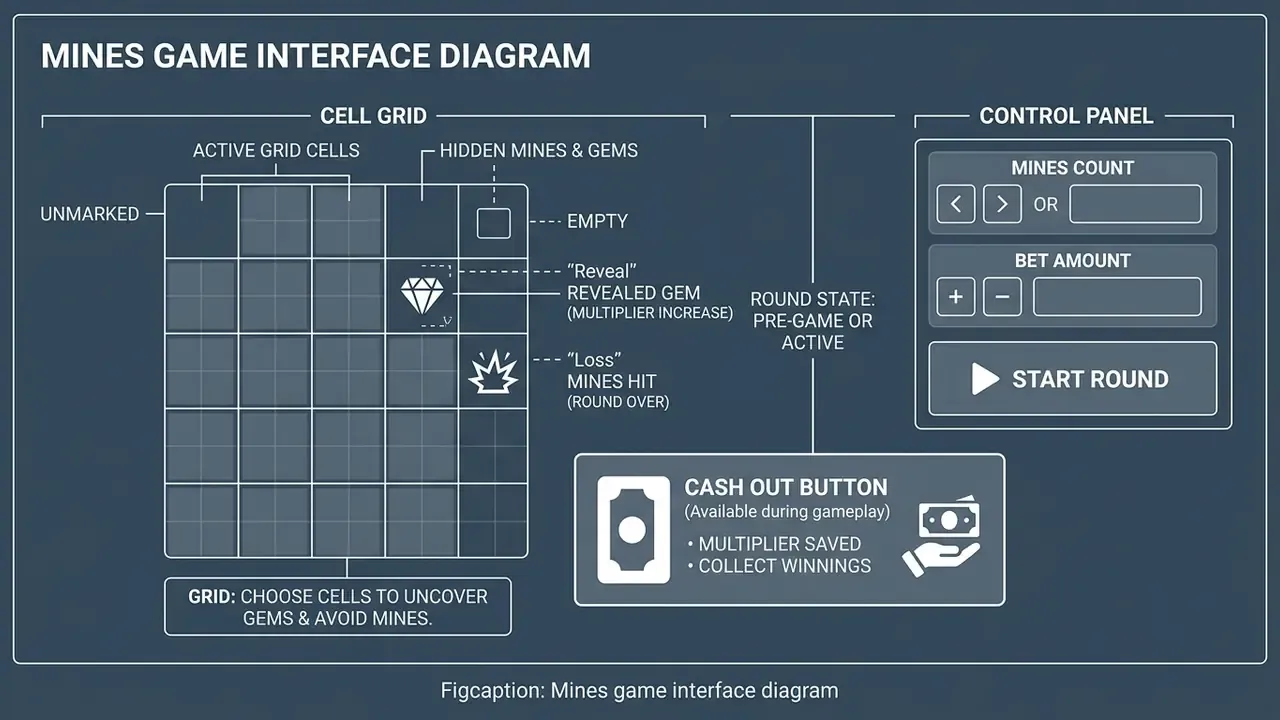
On mobile, browser versions adapt the 5x5 grid, bet controls and cash-out button to touchscreens without requesting device permissions or storage space. Downloadable native apps exist at some brands, but browser play offers the same encryption standards, the same Provably Fair verification tools and the same game speed, minus the installation risk.
How to install a mobile version safely:
- Never side-load third-party APK files from forums, file-sharing sites or unsolicited links. Repackaged casino APKs are a well-documented malware and credential-theft vector.
- Open the licensed operator's site in your mobile browser and confirm the domain and the padlock before logging in.
- Android: if an official client exists, download the APK only from the operator's own footer or the Google Play listing, then read the permissions requested. A casino client has no legitimate need for contacts, SMS or call logs.
- iOS: use Safari's Share → Add to Home Screen to install the progressive web app. You get a full-screen icon with no App Store dependency and no storage overhead.
- Keep the app or browser updated, since updates carry security fixes as well as performance work.
- Use a strong, unique password and switch on two-factor authentication where the operator supports it.
- Verify the casino's licence and reputation before registering, not after depositing.
Data usage and connection quality. The Mines client is light compared with animated video slots: a session consumes only a few megabytes an hour after the initial asset load, which makes it workable on constrained mobile data. Cash out, though, is a live server request. On unstable 3G or congested Wi-Fi, a delayed tap can resolve at a different grid state than the one you saw. On weak connections, prefer low-mine settings with early exits, or set Auto Cash Out so the multiplier is enforced server-side rather than by your thumb.